
- New
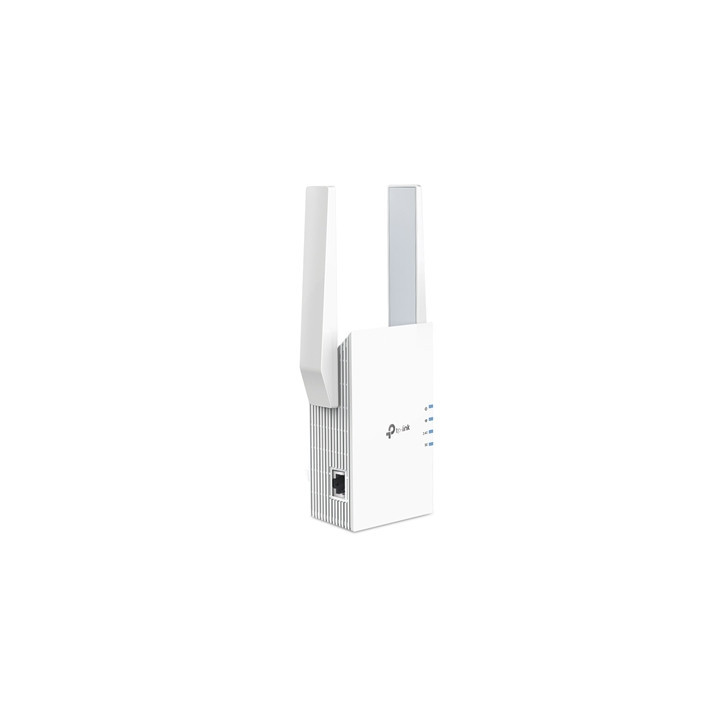
TP-Link RE705X AX3000 Wi-Fi 6 Range Extender images
TP-Link RE705X AX3000 Wi-Fi 6 Range Extender
Price:
£90.00
VAT included
TP-Link RE705X AX3000 Wi-Fi 6 Range Extender
Dual Band WiFi 6
Separates 5 GHz (2402 Mbps) and 2.4 GHz (574 Mbps) WiFi bands for faster speeds and greater capacity with the latest technology
EasyMesh-Compatible
Flexibly creates a Mesh network by connecting to an EasyMesh-compatible router for seamless whole-home coverage
AP Mode
Create a new WiFi access point through the Gigabit Ethernet port to enhance your wired network with WiFi capability
Gigabit Ethernet Port
Provides high-speed wired access ideal for smart TVs PCs and game consoles
App Control
Easy Setup and management with your network using the TP-Link Tether app
Life in the fast lane with advanced WiFi6
4 high-performance amplifiers we got you covered
Enjoy 4K streaming and gaming in whatever room you’re in thanks to RE705X’s 4 high-performance amplifiers. Whether you’re sharing a pad with friends or living in your forever home RE705X sends out strong signals to those hard-to-cover areas.
Adaptive Path Selection
Keeps your network running at top speed by automatically choosing the fastest connection path to the router.
Flexibly Create Whole Home Mesh WiFi
If you have any dead zones at home just add another Easymesh-Compatible router to further form your whole home multi-gigabit mesh WiFi. No more searching for a stable connection.
Built In Access Point Mode
RE705X is more than a wireless range extender. Simply plug an Ethernet cable into its Ethernet port and easily turn your wired internet connection into a 2x2 MU-MIMO dual band wireless access point.
Control at Your Fingertips
Set up and manage your WiFi through the TP-Link Tether app from your phone (Android iOS) including TP-Link routers and range extenders.
Specifications
Working Modes
Range Extender / Access Point
Interface
1 Gigabit Ethernet Port
Button
WPS Button Reset Button
Input Power
100-240V~50/60Hz
Max. Power Consumption
12.6W
Dimensions (W x D x H)
97 x 46 x 158
Antenna
2 External Antennas
Wireless Standards
IEEE 802.11a/n/ac/ax 5GHz IEEE 802.11b/g/n/ax 2.4GHz
Frequency
2.4GHz and 5GHz
Signal Rate
574 Mbps at 2.4GHz 2402 Mbps at 5GHz
Reception Sensitivity
5GHz:
11a 6Mbps:-97dBm
11a 54Mbps:-78dBm
11ax HE20 MCS0: -97dBm
11ax HE20 MCS11: -66dBm
11ax HE40 MCS0: -94dBm
11ax HE40 MCS11: -62dBm
11ax HE80 MCS0: -91dBm
11ax HE80 MCS11: -61dBm
11ax HE160 MCS11: -59dBm
2.4GHz:
11g 6Mbps:-96dBm
11g 54Mbps:-78dBm
11ax HE20 MCS0: -95dBm
11ax HE20 MCS11: -66dBm
11ax HE40 MCS0: -93dBm
11ax HE40 MCS11: -62dBm
Wireless Functions
Enable/Disable Wireless Radio
DFS (the latest firmware and hardware version is required)
Access Control
LED Control
Power Schedule
Wi-Fi Coverage
Wireless Security
WEP WPA WPA2 WPA3
Transmission Power
CE: 2.4GHz =16dBm 5GHz =21dBm
Mesh Technology
EasyMesh-Compatible
Network Services Enabled by Default
Web Server
Manage and configure device through web (HTTP/HTTPS)
Port: 80/443 Protocol: TCP
DHCP Server
IP address assignment (DHCP)
Port: 67 Protocol: UDP
App management
Manage and configure device through app
Port: 20001 Protocol: TCP
Port: 20002 Protocol: UDP
Certification
CE RoHS
System Requirements
Microsoft Windows 98SE NT 2000 XP Vista or Windows 7 8 8.1 10 MAC OS NetWare UNIX or Linux
Internet Explorer 11 Firefox 12.0 Chrome 20.0 Safari 4.0 or other Java-enabled browser
Package Content
Wi-Fi Range Extender RE705X
Quick Installation Guide
Separates 5 GHz (2402 Mbps) and 2.4 GHz (574 Mbps) WiFi bands for faster speeds and greater capacity with the latest technology
EasyMesh-Compatible
Flexibly creates a Mesh network by connecting to an EasyMesh-compatible router for seamless whole-home coverage
AP Mode
Create a new WiFi access point through the Gigabit Ethernet port to enhance your wired network with WiFi capability
Gigabit Ethernet Port
Provides high-speed wired access ideal for smart TVs PCs and game consoles
App Control
Easy Setup and management with your network using the TP-Link Tether app
Life in the fast lane with advanced WiFi6
4 high-performance amplifiers we got you covered
Enjoy 4K streaming and gaming in whatever room you’re in thanks to RE705X’s 4 high-performance amplifiers. Whether you’re sharing a pad with friends or living in your forever home RE705X sends out strong signals to those hard-to-cover areas.
Adaptive Path Selection
Keeps your network running at top speed by automatically choosing the fastest connection path to the router.
Flexibly Create Whole Home Mesh WiFi
If you have any dead zones at home just add another Easymesh-Compatible router to further form your whole home multi-gigabit mesh WiFi. No more searching for a stable connection.
Built In Access Point Mode
RE705X is more than a wireless range extender. Simply plug an Ethernet cable into its Ethernet port and easily turn your wired internet connection into a 2x2 MU-MIMO dual band wireless access point.
Control at Your Fingertips
Set up and manage your WiFi through the TP-Link Tether app from your phone (Android iOS) including TP-Link routers and range extenders.
Specifications
Working Modes
Range Extender / Access Point
Interface
1 Gigabit Ethernet Port
Button
WPS Button Reset Button
Input Power
100-240V~50/60Hz
Max. Power Consumption
12.6W
Dimensions (W x D x H)
97 x 46 x 158
Antenna
2 External Antennas
Wireless Standards
IEEE 802.11a/n/ac/ax 5GHz IEEE 802.11b/g/n/ax 2.4GHz
Frequency
2.4GHz and 5GHz
Signal Rate
574 Mbps at 2.4GHz 2402 Mbps at 5GHz
Reception Sensitivity
5GHz:
11a 6Mbps:-97dBm
11a 54Mbps:-78dBm
11ax HE20 MCS0: -97dBm
11ax HE20 MCS11: -66dBm
11ax HE40 MCS0: -94dBm
11ax HE40 MCS11: -62dBm
11ax HE80 MCS0: -91dBm
11ax HE80 MCS11: -61dBm
11ax HE160 MCS11: -59dBm
2.4GHz:
11g 6Mbps:-96dBm
11g 54Mbps:-78dBm
11ax HE20 MCS0: -95dBm
11ax HE20 MCS11: -66dBm
11ax HE40 MCS0: -93dBm
11ax HE40 MCS11: -62dBm
Wireless Functions
Enable/Disable Wireless Radio
DFS (the latest firmware and hardware version is required)
Access Control
LED Control
Power Schedule
Wi-Fi Coverage
Wireless Security
WEP WPA WPA2 WPA3
Transmission Power
CE: 2.4GHz =16dBm 5GHz =21dBm
Mesh Technology
EasyMesh-Compatible
Network Services Enabled by Default
Web Server
Manage and configure device through web (HTTP/HTTPS)
Port: 80/443 Protocol: TCP
DHCP Server
IP address assignment (DHCP)
Port: 67 Protocol: UDP
App management
Manage and configure device through app
Port: 20001 Protocol: TCP
Port: 20002 Protocol: UDP
Certification
CE RoHS
System Requirements
Microsoft Windows 98SE NT 2000 XP Vista or Windows 7 8 8.1 10 MAC OS NetWare UNIX or Linux
Internet Explorer 11 Firefox 12.0 Chrome 20.0 Safari 4.0 or other Java-enabled browser
Package Content
Wi-Fi Range Extender RE705X
Quick Installation Guide
-
Brand
-
ReferenceNPTPL-RE705X-TL01
-
In stock21 Items
-
EAN134897098683125
 Security policy
(edit with the Customer Reassurance module)
 Delivery policy
(edit with the Customer Reassurance module)
 Return policy
(edit with the Customer Reassurance module)
Comments (0)
Your review appreciation cannot be sent
Report comment
Report sent
Your report cannot be sent