
- New
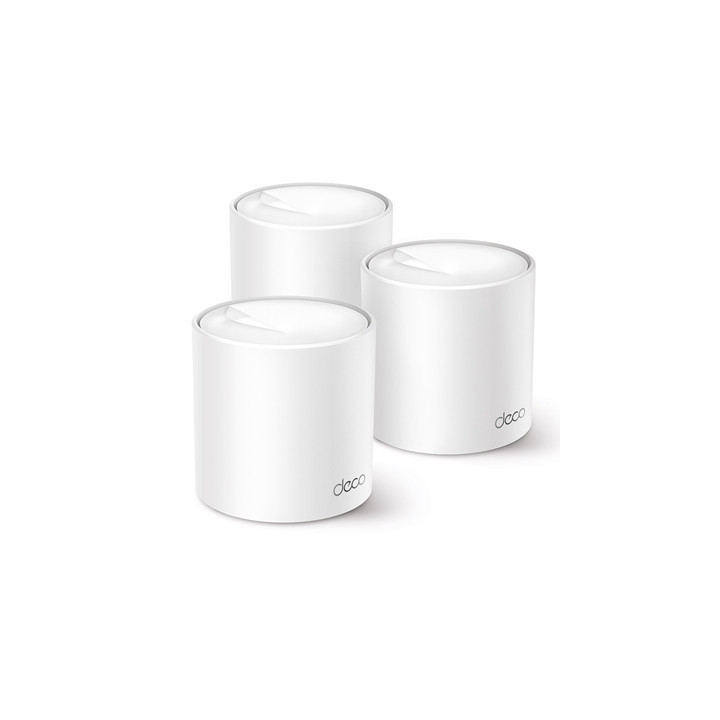
TP-Link Deco X50(3-pack) AX3000 Whole Home Mesh Wi-Fi 6 System 3 pack images
TP-Link Deco X50(3-pack) AX3000 Whole Home Mesh Wi-Fi 6 System 3 pack
Price:
£282.46
VAT included
TP-Link Deco X50(3-pack) AX3000 Whole Home Mesh Wi-Fi 6 System 3 pack
AX3000 Dual Band WiFi
Super-fast WiFi 6 with speeds up to 3.0 Gbps
4 Streams Less Lag
2x2/HE160 2402 Mbps + 2x2 574 Mbps
Gigabit Wired Speed
3x Gigabit ports provide sufficient connectivity
Boosted Seamless Coverage
Seamless mesh WiFi coverage up to 6 500 ft2 (3-pack)
AI-Driven Mesh
Intelligently learns the network environment to provide ideal WiFi unique to your home
TP-Link HomeShield
Provides comprehensive network protection robust parental controls and real-time IoT protection
Setup Made Easier Than Ever
The Deco app walks you through the setup step-by-step
Ultra-Fast WiFi 6 Mesh
Armed with WiFi 6 technology Deco whole home mesh WiFi is designed to deliver a huge boost in coverage speed and total capacity. Get on the latest mesh WiFi to enjoy the future network that loads faster and connects more.?
Whole-Home Coverage: WiFi Dead Zone Killer
With clearer and stronger signals enhanced by BSS Color and Beamforming Deco X50 boosts broader whole home WiFi coverage with great performance. Wireless connections and optional Ethernet backhaul work together to link Deco units providing even faster network speeds and truly seamless coverage. Want more coverage? Simply add another Deco.
AI-Driven Mesh: Always Learning Constantly Optimizing
Armed with AI-Driven Mesh Deco X50 delivers smart WiFi that follows you wherever you are without interruption. It automatically learns your network environment client quality and user behaviors. Sophisticated algorithms account for various factors so that Deco X50 provides ideal mesh WiFi unique to your home. Walk through your home and enjoy seamless streaming at the fastest possible speeds.
Seamless Roaming with One WiFi Name
TP-Link Mesh means Deco units work together to form one unified network. Your phone or tablet automatically connects to the fastest Deco as you move through your home creating a truly seamless WiFi experience.
Let the Experts Secure Your Home
Customize your home network with enhanced security using TP-Link HomeShield's kit of built-in features. Whether you're identifying network security holes limiting the time your children spend online or blocking websites HomeShield gives you the tools you need to fully manage your network.*
Quick Setup with the Deco App
Unbox Deco install the app and then simply follow the on-screen directions. Deco app will take care of the rest getting your network up and running in minutes.
More than a Router Functional and Beautiful
The pure white design simple but all-embracing evokes a wintery mood or a bright summer day. Deco X50 with a delicate body case makes it perfect to blend into various home decorations.
Specifications
Standards and Protocols
Wi-Fi 6
IEEE 802.11ax/ac/n/a 5 GHz
IEEE 802.11ax/n/b/g 2.4 GHz
WiFi Speeds
AX3000
5 GHz: 2402 Mbps (802.11ax HE160)
2.4 GHz: 574 Mbps (802.11ax)
WiFi Range
1-3 Bedroom Houses (1-pack)
TP-Link Mesh Technology
Optional Ethernet backhaul work together to link Deco units to provide seamless coverage
AI-Driven Mesh
Intelligently learns the network environment to provide ideal Wi-Fi unique to your home
3x Internal Antennas (Deco X50 V3.0)
WiFi Capacity
High
Dual-Band
Distribute devices to different bands for optimal performance
2x2 MU-MIMO
Simultaneously communicates with multiple MU-MIMO clients
OFDMA
Simultaneously communicates with multiple WiFi 6 clients
4 Streams
More than enough bandwidth for connected devices
Working Modes
Router Mode
Access Point Mode
Network Security
SPI Firewall
Access Control
HomeShield Security
Real-Time IoT Protection
Malicious Site Blocker
Intrusion Prevention System
DDoS Attack Prevention
Home Network Scanner
Guest Network
1x 5 GHz Guest Network
1x 2.4 GHz Guest Network
Effective Time
Bandwidth Control
VPN Server
Open VPN Server
PPTP VPN Server
L2TP VPN Server
VPN Client
Open VPN Client
PPTP VPN Client
L2TP VPN Client
WiFi Encryption
WPA-Personal
WPA2-Personal
WPA3-Personal
Button
Reset Button
Ethernet Ports
3x Gigabit Ports Per Deco Unit
Supports WAN/LAN auto-sensing
Advanced Features
Reboot Schedule
Tapo/Kasa onboarding
IoT network & Device Isolation
Static Router Function
Node/Band Connection Preference
Protocols
IPv4
IPv6
Service Kits
HomeShield
Parental Controls
HomeShield Parental Controls
Youtube Restriction
SafeSearch
Custom Profiles
Professional Content Filter Library
Family Time
Bedtime
Off Time
Time Rewards
Family Online Time Ranking
Pause the Internet
Weekly and Monthly Reports
WAN Types
Dynamic IP
Static IP
PPPoE
PPTP
L2TP
Quality of Service
HomeShield QoS
QoS by Device
Cloud Service
OTA Firmware Upgrade
TP-Link ID
DDNS
NAT Forwarding
Port Forwarding
UPnP
IPTV
IGMP Proxy
IGMP Snooping
Bridge
Tag VLAN
DHCP
Address Reservation
DHCP Client List
Server
DHCP
Address Reservation
DHCP Client List
Server
DDNS
TP-Link
Management Features
Deco App
Network Services Enabled by Default
Web Server
Manage and configure device through web (HTTP/HTTPS)
Port: 80/443 Protocol: TCP
DNS
Port: 53 Protocol: TCP & UDP
DHCP Server
IP address assignment (DHCP)
Port: 67 Protocol: UDP
App management
Manage and configure device through app
Port: 22 Protocol: TCP
Port: 20001 Protocol: TCP
Port: 30001 Protocol: TCP
Port: 20002 Protocol: UDP
WiFi Transmission Power
CE:
<20 dBm (2.4 GHz)
<23 dBm (5 GHz)
FCC:
<30 dBm (2.4 GHz)
<30 dBm (5 GHz)
Dimensions (W x D x H)
4.33 x 4.33 x 4.49 in
(110 x 110 x 114 mm)
System Requirements
Android 5.0 or later
iOS 9.0 or later
Certifications
CE FCC RoHS RCM
Package Content
3 Deco X50 units
1 RJ45 Ethernet cable
3 Power adapters
1 Quick Installation Guide
Super-fast WiFi 6 with speeds up to 3.0 Gbps
4 Streams Less Lag
2x2/HE160 2402 Mbps + 2x2 574 Mbps
Gigabit Wired Speed
3x Gigabit ports provide sufficient connectivity
Boosted Seamless Coverage
Seamless mesh WiFi coverage up to 6 500 ft2 (3-pack)
AI-Driven Mesh
Intelligently learns the network environment to provide ideal WiFi unique to your home
TP-Link HomeShield
Provides comprehensive network protection robust parental controls and real-time IoT protection
Setup Made Easier Than Ever
The Deco app walks you through the setup step-by-step
Ultra-Fast WiFi 6 Mesh
Armed with WiFi 6 technology Deco whole home mesh WiFi is designed to deliver a huge boost in coverage speed and total capacity. Get on the latest mesh WiFi to enjoy the future network that loads faster and connects more.?
Whole-Home Coverage: WiFi Dead Zone Killer
With clearer and stronger signals enhanced by BSS Color and Beamforming Deco X50 boosts broader whole home WiFi coverage with great performance. Wireless connections and optional Ethernet backhaul work together to link Deco units providing even faster network speeds and truly seamless coverage. Want more coverage? Simply add another Deco.
AI-Driven Mesh: Always Learning Constantly Optimizing
Armed with AI-Driven Mesh Deco X50 delivers smart WiFi that follows you wherever you are without interruption. It automatically learns your network environment client quality and user behaviors. Sophisticated algorithms account for various factors so that Deco X50 provides ideal mesh WiFi unique to your home. Walk through your home and enjoy seamless streaming at the fastest possible speeds.
Seamless Roaming with One WiFi Name
TP-Link Mesh means Deco units work together to form one unified network. Your phone or tablet automatically connects to the fastest Deco as you move through your home creating a truly seamless WiFi experience.
Let the Experts Secure Your Home
Customize your home network with enhanced security using TP-Link HomeShield's kit of built-in features. Whether you're identifying network security holes limiting the time your children spend online or blocking websites HomeShield gives you the tools you need to fully manage your network.*
Quick Setup with the Deco App
Unbox Deco install the app and then simply follow the on-screen directions. Deco app will take care of the rest getting your network up and running in minutes.
More than a Router Functional and Beautiful
The pure white design simple but all-embracing evokes a wintery mood or a bright summer day. Deco X50 with a delicate body case makes it perfect to blend into various home decorations.
Specifications
Standards and Protocols
Wi-Fi 6
IEEE 802.11ax/ac/n/a 5 GHz
IEEE 802.11ax/n/b/g 2.4 GHz
WiFi Speeds
AX3000
5 GHz: 2402 Mbps (802.11ax HE160)
2.4 GHz: 574 Mbps (802.11ax)
WiFi Range
1-3 Bedroom Houses (1-pack)
TP-Link Mesh Technology
Optional Ethernet backhaul work together to link Deco units to provide seamless coverage
AI-Driven Mesh
Intelligently learns the network environment to provide ideal Wi-Fi unique to your home
3x Internal Antennas (Deco X50 V3.0)
WiFi Capacity
High
Dual-Band
Distribute devices to different bands for optimal performance
2x2 MU-MIMO
Simultaneously communicates with multiple MU-MIMO clients
OFDMA
Simultaneously communicates with multiple WiFi 6 clients
4 Streams
More than enough bandwidth for connected devices
Working Modes
Router Mode
Access Point Mode
Network Security
SPI Firewall
Access Control
HomeShield Security
Real-Time IoT Protection
Malicious Site Blocker
Intrusion Prevention System
DDoS Attack Prevention
Home Network Scanner
Guest Network
1x 5 GHz Guest Network
1x 2.4 GHz Guest Network
Effective Time
Bandwidth Control
VPN Server
Open VPN Server
PPTP VPN Server
L2TP VPN Server
VPN Client
Open VPN Client
PPTP VPN Client
L2TP VPN Client
WiFi Encryption
WPA-Personal
WPA2-Personal
WPA3-Personal
Button
Reset Button
Ethernet Ports
3x Gigabit Ports Per Deco Unit
Supports WAN/LAN auto-sensing
Advanced Features
Reboot Schedule
Tapo/Kasa onboarding
IoT network & Device Isolation
Static Router Function
Node/Band Connection Preference
Protocols
IPv4
IPv6
Service Kits
HomeShield
Parental Controls
HomeShield Parental Controls
Youtube Restriction
SafeSearch
Custom Profiles
Professional Content Filter Library
Family Time
Bedtime
Off Time
Time Rewards
Family Online Time Ranking
Pause the Internet
Weekly and Monthly Reports
WAN Types
Dynamic IP
Static IP
PPPoE
PPTP
L2TP
Quality of Service
HomeShield QoS
QoS by Device
Cloud Service
OTA Firmware Upgrade
TP-Link ID
DDNS
NAT Forwarding
Port Forwarding
UPnP
IPTV
IGMP Proxy
IGMP Snooping
Bridge
Tag VLAN
DHCP
Address Reservation
DHCP Client List
Server
DHCP
Address Reservation
DHCP Client List
Server
DDNS
TP-Link
Management Features
Deco App
Network Services Enabled by Default
Web Server
Manage and configure device through web (HTTP/HTTPS)
Port: 80/443 Protocol: TCP
DNS
Port: 53 Protocol: TCP & UDP
DHCP Server
IP address assignment (DHCP)
Port: 67 Protocol: UDP
App management
Manage and configure device through app
Port: 22 Protocol: TCP
Port: 20001 Protocol: TCP
Port: 30001 Protocol: TCP
Port: 20002 Protocol: UDP
WiFi Transmission Power
CE:
<20 dBm (2.4 GHz)
<23 dBm (5 GHz)
FCC:
<30 dBm (2.4 GHz)
<30 dBm (5 GHz)
Dimensions (W x D x H)
4.33 x 4.33 x 4.49 in
(110 x 110 x 114 mm)
System Requirements
Android 5.0 or later
iOS 9.0 or later
Certifications
CE FCC RoHS RCM
Package Content
3 Deco X50 units
1 RJ45 Ethernet cable
3 Power adapters
1 Quick Installation Guide
-
Brand
-
ReferenceNPTPL-DECOX503-TL01
-
In stock8 Items
-
EAN134897098681732
 Security policy
(edit with the Customer Reassurance module)
 Delivery policy
(edit with the Customer Reassurance module)
 Return policy
(edit with the Customer Reassurance module)
Comments (0)
Your review appreciation cannot be sent
Report comment
Report sent
Your report cannot be sent